Piping MTO Excel template
A free, line-based piping MTO Excel template: one row per line, item and size, pipe in metres, fittings in each; download it without signing up. A piping MTO lists every pipe, fitting, flange and valve in the job. This template has those columns in the same order as the Excel workbook Metriq MTO returns. It is blank and has no formulas.
What is in the file
- MTO: the line-based sheet, one row per line, item and size, with a unit list (M or EA) so the units stay consistent.
- Summary: totals by item and size, the view procurement and pricing tools want. Fill it from a pivot of the MTO sheet.
- How to use: what each column is for, in one line each.
What each column means
| Column | What goes in it |
|---|---|
| Item No. | A running number, so a row can be referred to in a query or a revision. |
| Source Model | The source model or package the row comes from. Only needed when the job is a federation of several. |
| Line / Drawing | The line number, or the drawing where the model carries no line numbers. |
| Material Code | What the item is, as a code: PIPE, 90 BEND, CON RED, or your client’s own codes. |
| Sub Type | The detail that changes the price: weld neck or slip-on for a flange, type and rating for a valve. |
| Material | Carbon steel, stainless steel, copper and so on, where the model publishes it. |
| Size 1 (inch) | The nominal size in inches. |
| Size 2 (inch) | The second size, on reducing items only: reducers and reducing tees. |
| Quantity | Metres for pipe, a count for everything else. |
| Qty. Units | M for pipe, EA for fittings, flanges and valves. |
| Remark | Anything the estimator needs to know about the row. |
Units and sizes
Pipe is measured in metres, as the net length in the model, with no waste or cutting allowance. Add those when you price, where they belong, so the take-off stays checkable against the model. Fittings, flanges and valves are counted in each. A QS turning these rows into a bill can follow the NRM2 pipework rules.
Sizes are nominal, in inches in this template. A reducing item needs both of its sizes, written large × small, for example 6″ × 4″. A reducing tee with a blank second size cannot be ordered, and the mistake is easy to miss because the row looks complete. If your client works in DN, rename the size columns and keep the same rule.
Why line by line
A single total per item is enough to buy bulk material, but not to price or check a job. Rows split by line let you:
- Check the take-off against an isometric or a line list, one line at a time.
- Price a revision by the lines that changed, instead of starting again. See comparing quantities between revisions.
- Answer the client when they ask what is in a system, or what was left out.
- Hand over to procurement by system or area, without re-sorting the sheet.
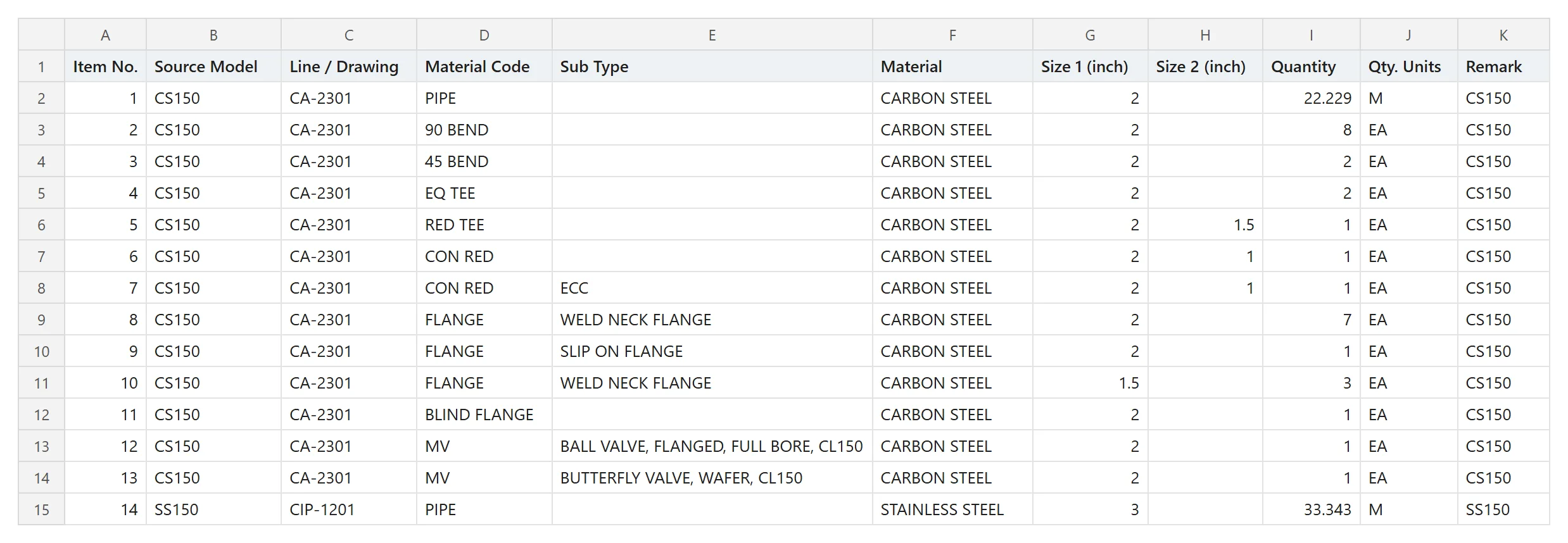
Filling it by hand from a model
- List the lines from the model’s line number property, or from the line list if the model has none.
- For each line, select the piping objects by property, then sum pipe length by size and count each fitting, flange and valve by type and size. Our guide to counting fittings and valves in Navisworks walks through it.
- List what you could not classify on its own, rather than leaving it out or guessing.
- Check the totals by size against an independent count before you price.
If a term is unfamiliar, the piping take-off glossary defines it. For the full picture of a take-off from a Navisworks model, start with how to get a piping MTO from an NWD, and for getting the sheet into a pricing tool see from a model MTO to Trimble Estimation MEP.
Or get it filled from your NWD
Metriq MTO turns a Navisworks NWD of up to 300 MB into this layout, with a PDF report you can send with the bid. A single model comes in the standard template; on the monthly plan the workbook follows your client’s own MTO template, set up by us in the first month. It costs £100 for a single model or £200 a month, both plus VAT or local tax.
Questions
What is a piping MTO?
A piping material take-off (MTO) is the list of every pipe, fitting, flange and valve a job needs, with a quantity for each: pipe in metres, everything else counted. Estimators price from it and procurement buys from it.
What units should a piping MTO use?
Pipe in metres, measured as the net length without a waste allowance, and fittings, flanges and valves in each. Sizes are nominal; reducing items carry both sizes, written large × small, for example 6″ × 4″. Add waste and cutting allowances when you price, not in the take-off.
Can I change the template to my client’s format?
Yes. Rename, reorder or add columns as your client asks. Keep one row per line, item and size, and keep the units consistent, and any pricing tool or pivot table will read it.